Covered Call Tracker
Premium, Rolls and P&L for Every Call You Sell
OptionsVault groups your shares and the calls sold against them into one position, then keeps the running total: premium collected, what you paid to roll, and what the whole position has made.
How to Track Covered Calls
A covered call is 100 shares you own plus a call option you sold against them. Tracking one means keeping three things together, because the result only makes sense when you add them up:
1
The shares
Ticker, how many, the price you paid and the date.
2
Each call you sell
Date, strike, expiration, number of contracts, premium per share and fees.
3
How each call ended
Expired, bought back (and what you paid), rolled to a new call, or assigned.
From those records, four numbers tell you how the position is doing. The examples use 100 MSFT shares bought at $415, with a $425 call sold for $4.80 per share:
| Number | How to work it out | Example |
|---|---|---|
| Premium collected | Premium from calls sold, minus anything paid to buy calls back | $4.80 × 100 shares = $480 |
| Break-even | Price paid per share, minus premium collected per share | $415.00 − $4.80 = $410.20 |
| Most you can make | (Strike − price paid + premium) × shares | ($425 − $415 + $4.80) × 100 = $1,480 |
| Return on capital | Premium ÷ what the shares cost | $480 ÷ $41,500 = 1.2% in 30 days |
Repeated every 30 days, a 1.2% return works out to about 14.1% a year. Real results vary, because premiums change and some calls get assigned. The break-even here is a trading number, not your tax basis: for taxes, use the records your broker sends you. To run these numbers for a call of your own, use the free covered call calculator.
Covered Call Payoff Chart
Selling the call moves your whole result up by the premium and puts a ceiling on it at the strike. This is the same MSFT position at expiration, next to simply holding the shares:
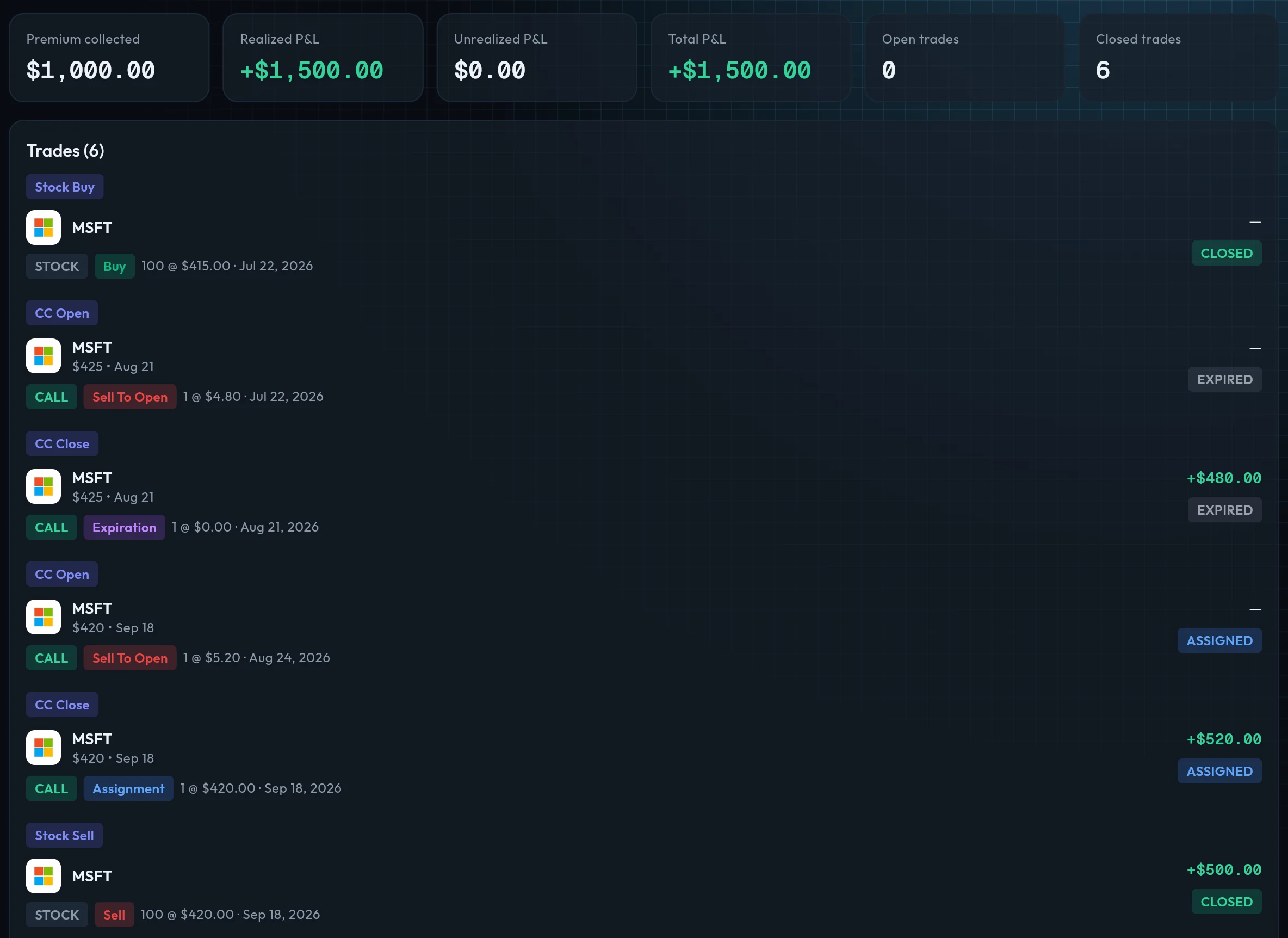
Covered Call Example: Two Calls on MSFT
One call is rarely the whole story. Here the first call expires, a second is sold on the same shares, and that one is assigned. Each premium lowers what the shares have effectively cost you:
| Action | Share price | Premium | Net cost per share |
|---|---|---|---|
| Buy 100 MSFT shares | $415.00 | — | $415.00 |
| Sell MSFT $425 call (30 days out) | — | +$480 | $410.20 |
| Call expires worthless | — | Kept | $410.20 |
| Sell MSFT $420 call (30 days out) | — | +$520 | $405.00 |
| Shares called away at $420 | $420.00 | Kept | — |
| Total | $1,000 premium | +$500 on the shares | |
That is $1,500 on $41,500 of capital: 3.6% in about 60 days, or roughly 22% a year at that pace, before fees. In OptionsVault all of this is one position, summarised like this:
Premium collected
$1,000
Realized P&L
+$1,500
Status
Closed
Illustration of the example, with fees left out. Prices are made up for the walkthrough, not quotes.
Covered Call Spreadsheet or Tracking Software?
A spreadsheet is a fine place to start. One row per call, a column for premium, and you can see your income. It stops being enough at about the point where the work becomes matching rows by hand:
- Rolls. A buy-back and a new call are two trades that belong to one decision. Miss the buy-back and your premium total is too high.
- Assignments. The call disappears, the shares are sold, and the gain on the shares has to be added to the premium from every call before it.
- More than one account or ticker. The same formulas, copied and kept in step, for every position.
OptionsVault takes over that matching. It reads your trades from your broker or a CSV file, works out which trades belong together, and keeps the totals current.
What OptionsVault Tracks for Covered Calls
Three ways to get trades in
Connect your broker for automatic sync (Pro), import a CSV export, or type trades in by hand. No formulas to maintain.
Groups each position for you
OptionsVault finds the calls you sold, the shares they were sold against, any buy-backs and the sale of the shares if you were assigned, and suggests them as one covered call position.
Premium and P&L per position
Each position shows premium collected (net of buy-backs), realized P&L across the shares and the calls, and how many trades are still open.
Rolls stay in one place
After each broker sync, new calls on the same shares join the position they belong to, so a call rolled five times is still one position with one running total.
Expirations and assignments handled
An expired or assigned call is closed with its full premium realized. Each open position shows its next expiration date.
See how covered calls are doing overall
Analytics compares your covered calls with your other strategies: P&L, win rate and premium. P&L is also broken down by ticker, by month and on a calendar.
OptionsVault is a tracker, not a screener: it does not scan for calls to sell, show live Greeks or send assignment alerts.
Covered Call Outcomes at Expiration
Every covered call ends one of three ways, and each one changes what you record next:
Stock ends below the strike
Call expires worthless
You keep the premium and the shares, and can sell another call.
Stock ends above the strike
Shares are called away
You keep the premium and sell the shares at the strike. Any rise beyond the strike is not yours.
Stock falls a long way
Call expires worthless
You keep the premium, but the shares are worth less. Below your break-even the position is losing money.
Choosing a Strike for a Covered Call
The strike decides the trade-off. A strike close to the current price (a higher delta) pays more premium, and your shares are more likely to be called away. A strike further above it (a lower delta) pays less, and you are more likely to keep the shares.
Around 0.20 delta: well above the current price. Less premium and a lower chance of assignment. A common choice for shares you want to keep.
Around 0.30 delta: the middle ground many income sellers use.
Around 0.40 delta and higher: close to the current price. More premium and a real chance the shares are sold. Use it when you are happy to let them go at the strike.
Delta and the other terms are explained in our guides to choosing a strike price (written for option buyers, though delta reads the same way) and options terminology.
Rolling a Covered Call, and How to Record It
Rolling means buying back the call you sold and selling a new one at a different strike or expiration.
Let it expire when the call is far out of the money and worth a few cents. There is little left to gain by closing it.
Roll out (same strike, later date) when the stock is near your strike and you would rather collect more premium than be assigned.
Roll up and out (higher strike, later date) when the stock has risen past your strike and you want a higher exit price. This can cost money rather than bring it in.
A roll is where records most often go wrong, because the cost of the buy-back has to come off the premium. In OptionsVault premium collected is always net of buy-backs, and the new call joins the same position, so the total stays right however many times you roll.
Covered Calls as Part of the Wheel Strategy
If you run the wheel strategy, covered calls are the second half of the cycle: a cash-secured put is assigned, you hold the shares, and you sell calls against them. On the Pro plan, OptionsVault groups the put, the assigned shares and the calls as one wheel, so you see the return on the whole cycle rather than the calls on their own.
Covered Call Tracking Questions
How do I keep track of covered calls?
Record the shares (ticker, quantity and purchase price), then every call you sell against them: date, strike, expiration, premium and fees, and how it ended (expired, bought back, rolled or assigned). From those you can work out premium collected, your break-even and the return on the money tied up. A spreadsheet works for a few positions. A tracker like OptionsVault does the grouping and the math from your imported trades.
How do you calculate the break-even on a covered call?
Take the price you paid per share and subtract the premium you received per share. Shares bought at $415.00 with a call sold for $4.80 break even at $410.20. Each further call you sell on the same shares lowers it again.
What happens to my records when a covered call is assigned?
The call is closed and you keep its full premium, and your shares are sold at the strike price. In OptionsVault the assignment and the sale of the shares join the same covered call position, so its realized P&L includes both the premium and the gain or loss on the shares.
Can I track covered calls in a spreadsheet?
Yes, and for one or two positions it is enough. It gets harder when you roll calls, close part of a position, get assigned or trade in more than one account, because every one of those needs rows matched by hand. That is the work a tracker takes over.
Does OptionsVault find covered calls to sell?
No. OptionsVault is a tracker and journal, not a screener or scanner. It does not scan the market or suggest strikes. It records the calls you have sold and shows what they earned.
Is the covered call tracker free?
Covered call tracking is part of the free plan, using manual entry or CSV import, with a limit on how many positions can be active at once. Connecting a broker for automatic sync needs Pro. The pricing page has the current limits and price.
See pricing for what the free and Pro plans include.
Start Tracking Your Options Trades Today
Join options sellers who use OptionsVault to track strategies, analyze performance, and grow their portfolio. Free to start.