Options Trading Journal
What to Track, a Free Template, and a Faster Way
A journal is how you find out which of your options trades actually make money. Here is what to record, a template to start with, and how OptionsVault keeps the journal for you.
What an Options Trading Journal Is For
Your broker already keeps a list of your orders. A journal is different: it keeps the result. It answers how much premium you collected this quarter, which stocks you keep losing on, and whether the puts that got assigned came out ahead in the end.
Options make this harder than stocks, because one position is often several trades. A cash-secured put is assigned and becomes shares. You sell covered calls on them for two months. The shares are called away. That is one wheel and five or more lines in your order history, and only the total tells you how it went.
What to Track in an Options Trading Journal
Ten columns are enough. Everything else, from premium collected to win rate, can be worked out from them:
| What to record | Template column | Why it matters |
|---|---|---|
| Trade date | trade_date | Puts every trade in order, so an assignment lands after the put that caused it. |
| Ticker | symbol | Lets you add up everything you did on one stock. |
| Type | trade_type | Stock, call or put. |
| Action | action | Whether the trade opened a position or closed one: sold to open, bought to close, assigned, expired. |
| Quantity | quantity | Shares, or option contracts. |
| Price | price | Per share. For an option this is the premium per share, so one contract is the price times 100. |
| Strike | strike | With the expiration, it says which contract this was. |
| Expiration | expiration | Ties an opening trade to the close, expiration or assignment that ended it. |
| Fees | commission | Small on each trade, noticeable over a year. |
| Notes | notes | Why you took the trade. This is the part you will want to read later. |
Free Options Trading Journal Template
The template is a CSV file with those ten columns and eight example rows: one full wheel, and one put that expires. It opens in Excel, Google Sheets or Numbers. Delete the examples and add a row for each trade.
Download the template (CSV)No sign-up needed. The columns match what OptionsVault reads, so the same file can be brought in later with CSV import.
What to Review in Your Journal
Recording trades is half of it. The value comes from looking back, and these six numbers cover most of what an options seller needs:
Premium collected
Everything you were paid for selling options, less what you paid to buy any back.
Realized P&L
What closed positions actually made, including the gain or loss on shares you were assigned.
Win rate and profit factor
How often you win, and whether the wins outweigh the losses. A high win rate with a low profit factor means a few losses are undoing many small wins.
P&L by ticker
Which stocks pay you and which only feel like they do.
P&L by month
Whether the income is steady or one bad month takes back three good ones.
P&L by strategy
Covered calls next to cash-secured puts and wheels, so you know where to put more capital.
Options Journal Spreadsheet vs. OptionsVault
A spreadsheet is the right tool to start with, and for a few trades a month it may be all you need. The difference shows once positions span several trades:
| Spreadsheet | OptionsVault | |
|---|---|---|
| Costs nothing to start | ||
| You control every column and formula | ||
| Trades arrive without typing | ||
| Groups a put, the shares and the calls into one position | ||
| Handles assignments and expirations without extra rows | ||
| Win rate, profit factor and P&L by ticker without formulas | ||
| Still right after you roll a position five times |
What OptionsVault Keeps for You
Trades in without typing
Connect Robinhood and trades sync on their own, with a fresh check every night (Pro). From any other broker, import a CSV file. More brokers are planned.
Strategies found for you
OptionsVault reads your trades and suggests the positions they belong to: covered calls and cash-secured puts on every plan, wheels and LEAPs on Pro.
A dashboard for option sellers
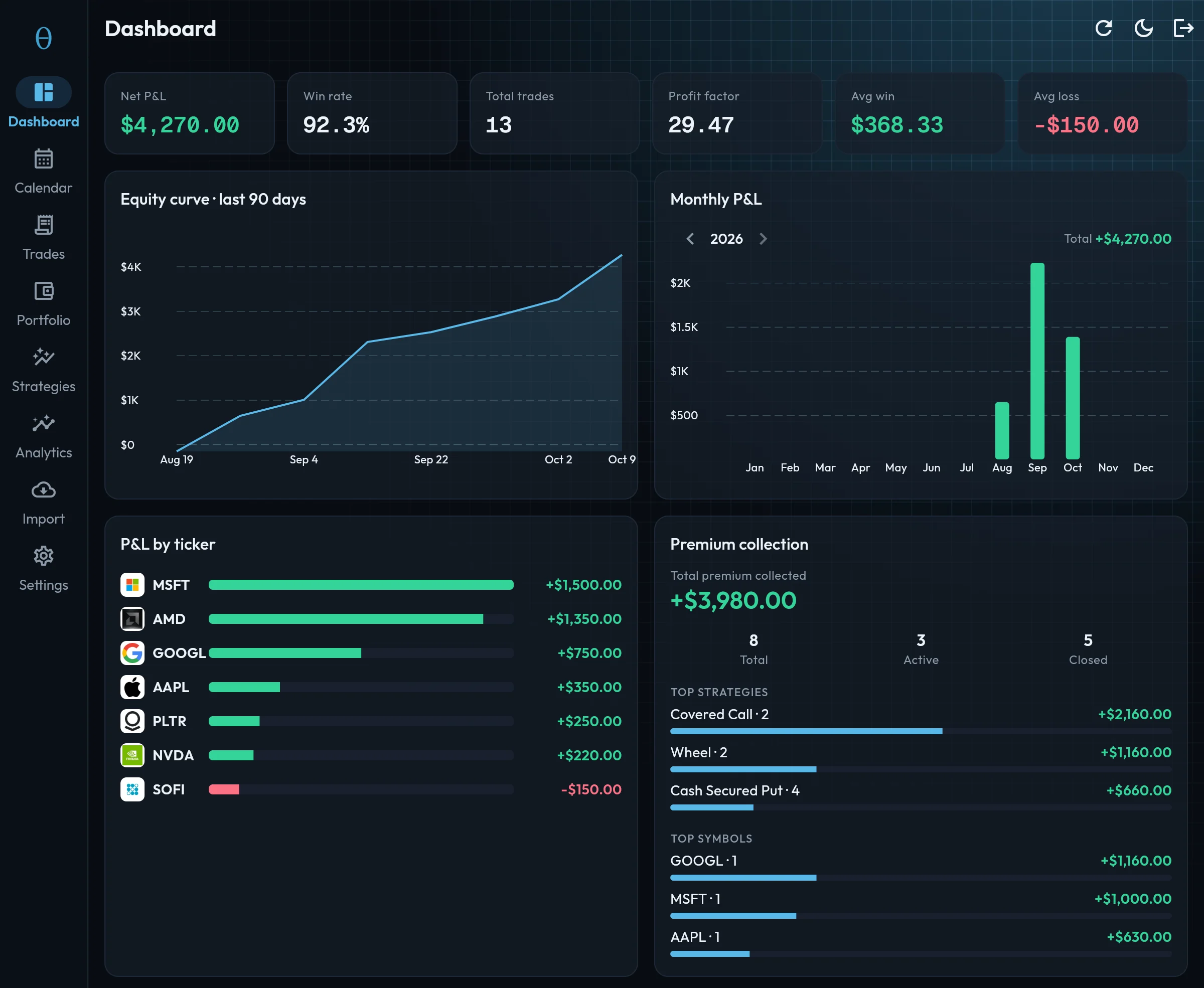
Total P&L, win rate and profit factor, an equity curve, P&L by month and by ticker, and total premium collected with your top strategies and tickers.
A P&L calendar
Realized P&L on each day of the month, with your best day, worst day and number of trading days.
Strategy analytics
Each strategy type side by side: P&L, win rate and premium, so you can see which approach is earning its place.
Every account in one journal
Several accounts sit in one journal. Look at them together or switch to one, and the whole app follows.
OptionsVault is a journal, not a trading platform or a screener: no order entry, no live quotes or Greeks, no alerts.
What the Journal Looks Like
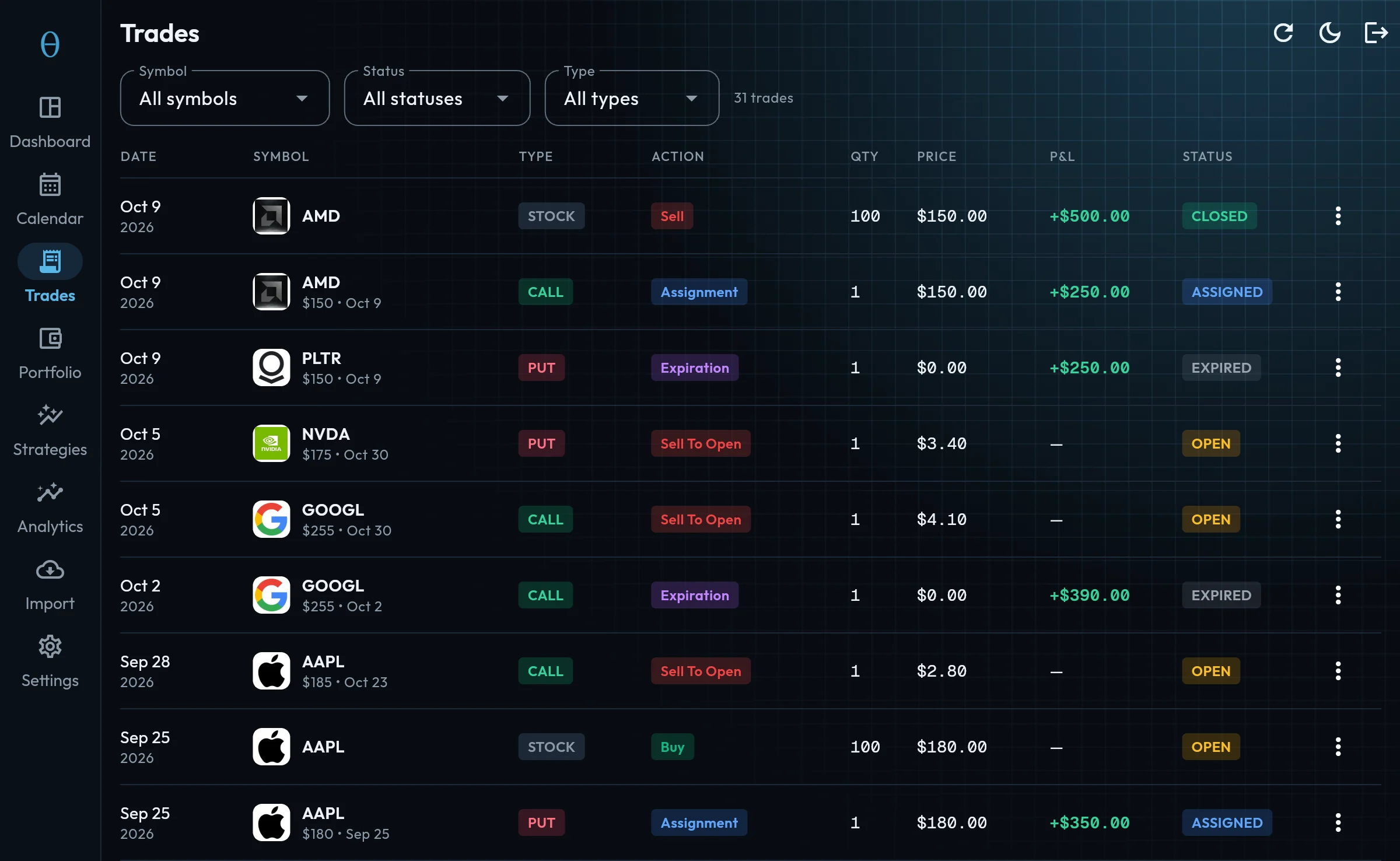
Two screens do most of the work. The dashboard answers how you are doing, and the trades list is the record behind it. Both are shown here with example trades.
How Automatic Strategy Detection Works
After your trades are in, OptionsVault looks at each stock for four patterns and suggests what it finds. You accept a suggestion and it becomes a position with its own totals. Nothing is tagged by hand.
| Strategy | What it looks for |
|---|---|
| Covered call | A call you sold, with the shares it was sold against (bought up to 30 days earlier), any buy-backs, and the sale of the shares if you were assigned. |
| Cash-secured put | A put you sold to open that did not lead to shares, with its buy-back if there was one. |
| Wheel | A put you sold, shares bought at its strike within 30 days because it was assigned, and a call sold on those shares within a week. |
| LEAP | An option you bought with at least 180 days to expiration, with its close if there was one. |
After each broker sync, new trades on the same stock are added to the open position they belong to.
Who OptionsVault Is For
People who sell options for income: covered calls, cash-secured puts and the wheel. It suits you if you:
- Run wheels on several stocks and lose track of which cycle is at which stage
- Sell covered calls and want one running total per position, rolls included
- Trade on Robinhood and want the trades to arrive on their own
- Have a spreadsheet that has become a second job
It is the wrong tool if you day trade and want charts, screenshots and setup tags on each trade. A general trading journal does that better.
Options Trading Journal Questions
What is an options trading journal?
A record of every options trade you make and how it turned out, kept so you can review it. For each trade it holds the date, ticker, strike, expiration, premium and fees, and how the trade ended. Its purpose is to show which of your trades and habits make money.
What should I track in an options trading journal?
Ten things for each trade: date, ticker, type (stock, call or put), action (opened, closed, assigned or expired), quantity, price, strike, expiration, fees and a note on why you took it. From those you can work out premium collected, realized P&L, win rate and P&L by ticker and by month.
Is there a free options trading journal template?
Yes. This page has a free template as a CSV file with those ten columns and a worked example. It opens in Excel, Google Sheets or Numbers, and the same file can be imported into OptionsVault later.
Can I keep an options trading journal in Excel or Google Sheets?
Yes, and it is a good way to start. A spreadsheet handles single trades well. It gets harder with rolls, assignments and wheels, because the related rows have to be matched by hand before the totals mean anything.
Is OptionsVault free?
There is a free plan that includes CSV import, the dashboard and tracking for covered calls and cash-secured puts. Robinhood sync and wheel tracking are part of Pro. The pricing page has the current limits and price.
Is OptionsVault only for people who sell options?
It is built for them. It records any stock or option trade, but its strategy tracking covers covered calls, cash-secured puts, wheels and LEAPs. If you day trade and want chart screenshots and setup tags on each trade, a general trading journal will suit you better.
See pricing for what the free and Pro plans include.
Start Tracking Your Options Trades Today
Join options sellers who use OptionsVault to track strategies, analyze performance, and grow their portfolio. Free to start.