Trading Journal for Robinhood
Sync Your Options Trades, See What They Earned
Robinhood shows you each order. OptionsVault connects to your Robinhood account and shows you each position: the puts, shares and calls that belong together, and what they made.
Why Keep a Trading Journal Alongside Robinhood
Robinhood is built for placing trades. Its history is a list of orders in date order, which is the right record for what you did and the wrong shape for answering how it went.
If you sell options, the questions are about positions, not orders. How much premium have my covered calls on one stock brought in? Did that cash-secured put that got assigned come out ahead once I sold calls on the shares? A journal answers those by putting the related orders back together.
Five Robinhood Orders, One Position
Here is a wheel on AMD as an order history lists it. Each line is correct, and none of them tells you the result:
| Date | Order | Cash |
|---|---|---|
| Mar 3 | Sell 1 AMD $145 put | +$280 |
| Mar 28 | AMD $145 put assigned | — |
| Mar 28 | Buy 100 AMD at $145 | -$14,500 |
| Apr 1 | Sell 1 AMD $150 call | +$250 |
| Apr 25 | Sell 100 AMD at $150 (called away) | +$15,000 |
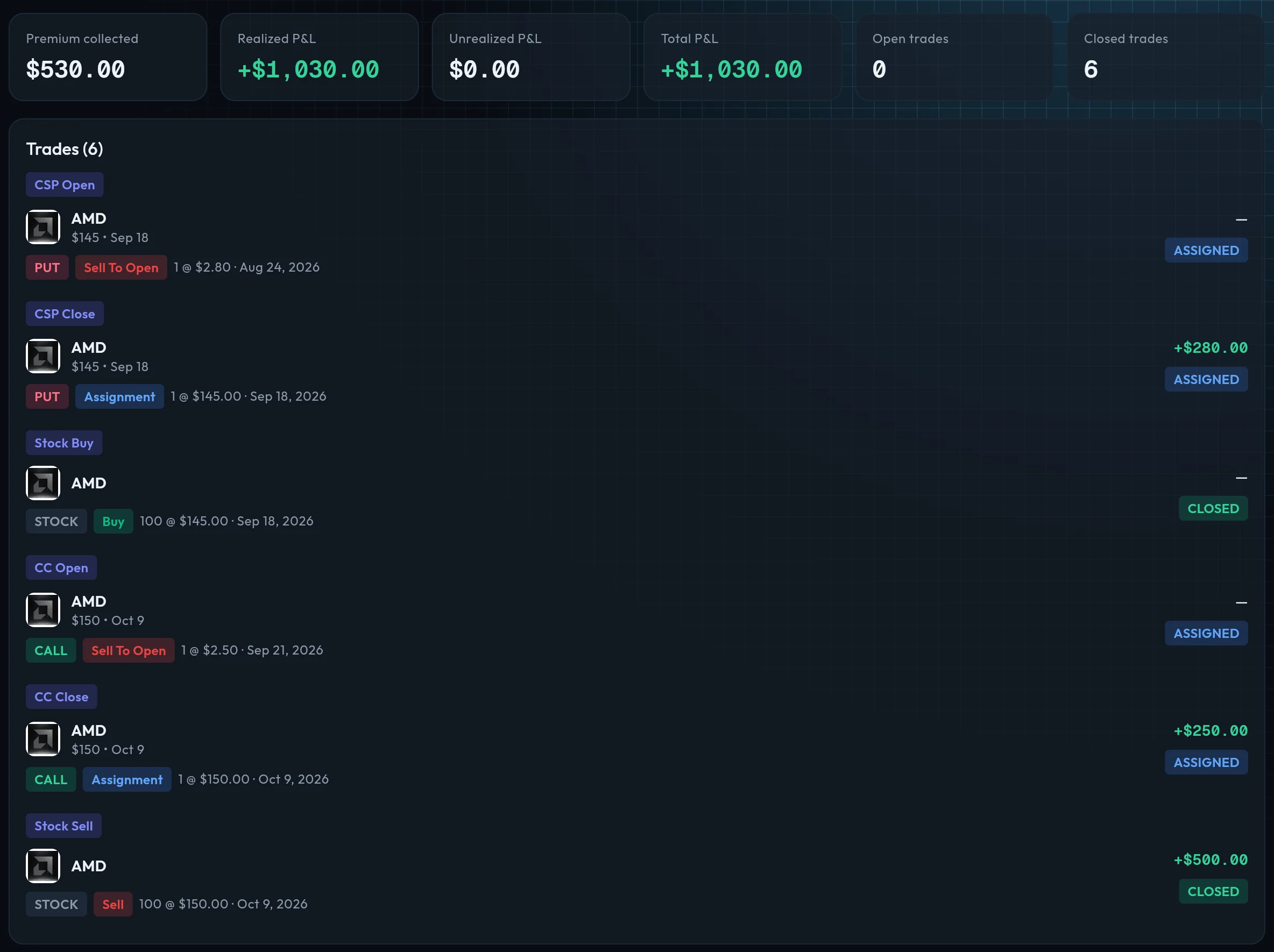
In OptionsVault those 5 lines are one wheel position:
Premium collected
$530
Realized P&L
+$1,030
Status
Closed
$530 of premium plus $500 on the shares. Illustration with made-up prices and fees left out. Grouping a wheel is a Pro feature.
How the Robinhood Sync Works
- Connect. In OptionsVault, choose Connect broker. You sign in to Robinhood on a connection page run by SnapTrade, the service that provides the link.
- Wait a few minutes. A new connection usually takes 5 to 15 minutes before your accounts appear.
- Sync. Choose how far to look back, up to 365 days, and your trades are imported. After that a nightly sync picks up anything new.
- Review the suggestions. OptionsVault suggests the covered calls, cash-secured puts and wheels it finds. Accept them and each becomes a position with its own totals.
Robinhood sync is part of the Pro plan. On the free plan you can still keep a Robinhood journal by importing a CSV file or entering trades by hand.
What Comes Across from Robinhood
| From your Robinhood account | Imported |
|---|---|
| Stock buys and sells | |
| Options bought or sold to open, and to close | |
| Option assignments, exercises and expirations | |
| Current positions, for the live portfolio view (Pro) | |
| Dividends, deposits, withdrawals and transfers |
What You Get with OptionsVault and Robinhood
Robinhood sync
Connect Robinhood once and your stock and options trades come in on their own, with a fresh check every night. No exports to download. (Pro)
Trades grouped into strategies
OptionsVault reads your Robinhood trades and suggests the positions they belong to: covered calls and cash-secured puts on every plan, wheels and LEAPs on Pro.
Premium and P&L you can read
Premium collected and realized P&L per position, plus P&L by ticker, by month and on a calendar, and win rate by strategy type.
Assignments and expirations included
Assigned, exercised and expired options arrive with the rest of your trades, so a put that turned into shares is not left hanging open.
More than one account
If you have several Robinhood accounts, each one can be switched on or off, and the journal can be filtered to a single account.
It only reads
OptionsVault reads your trade history and positions. It never places orders or moves money, and you can disconnect at any time.
OptionsVault is a journal, not a trading platform or a screener: no order entry, no live quotes or Greeks, no alerts.
What to Review in Your Robinhood Journal
A journal earns its keep when you look at it. Once your Robinhood trades are in, four views are worth a few minutes each month:
- P&L by month. Is the income steady, or did one bad month take back three good ones?
- P&L by ticker. Which stocks actually pay you, and which only feel like they do?
- Strategy analytics. Win rate and premium for covered calls next to cash-secured puts and wheels.
- Open positions. What is still on, how much premium it has brought in so far, and when it next expires.
Other Brokers
Robinhood is the only broker with automatic sync today, and more are planned. If you also trade somewhere else, add those trades by CSV import or by hand and they sit in the same options trading journal, in their own account.
Robinhood Trading Journal Questions
Is there a trading journal that works with Robinhood?
Yes. OptionsVault connects to Robinhood and imports your stock and options trades automatically. It is built for people who sell options, so it groups those trades into covered calls, cash-secured puts and wheels and shows the premium and P&L for each.
Is the Robinhood trading journal free?
OptionsVault has a free plan: you can enter trades by hand or import a CSV file and use the journal, the dashboard and covered call and cash-secured put tracking. Automatic Robinhood sync is part of Pro. The pricing page has the current limits and price.
Does OptionsVault get my Robinhood password?
No. You sign in to Robinhood on a connection page run by SnapTrade, the service that provides the link. OptionsVault receives your trades and positions, not your Robinhood username or password.
How far back does the Robinhood sync go?
You choose how far to look back when you sync, up to 365 days. After that, a nightly sync picks up new trades. Older history can be added with a CSV import.
Can OptionsVault place trades in my Robinhood account?
No. OptionsVault is a journal. It reads your trade history and positions and has no feature for placing orders or moving money.
How is OptionsVault different from TraderSync or TradeZella for Robinhood?
TraderSync and TradeZella are general trading journals that cover many markets and styles of trading. OptionsVault is narrower. It is built for selling options, so its job is to turn a list of Robinhood orders into covered call, cash-secured put and wheel positions with their premium and P&L. If you mainly day trade stocks or futures, a general journal will suit you better.
Does it work with brokers other than Robinhood?
Robinhood is the only broker with automatic sync today, and more are planned. Trades from any other broker can be added by CSV import or by hand, and they sit in the same journal as your Robinhood trades.
See pricing for what the free and Pro plans include.
Start Tracking Your Options Trades Today
Join options sellers who use OptionsVault to track strategies, analyze performance, and grow their portfolio. Free to start.