Wheel Strategy Tracker
The Put, the Shares and the Calls as One Position
A wheel runs for weeks across three kinds of trade. OptionsVault keeps them together and adds them up, so you can see what the whole cycle made.
What Is the Wheel Strategy?
The wheel is a way of selling options on a stock you are willing to own. It has three stages, and you collect a premium in two of them.
1. Sell a cash-secured put. You sell a put at a price you would be happy to pay for the shares and collect the premium. If the stock stays above the strike, the put expires and you sell another. If it falls below, you are assigned.
2. Own the shares. You buy 100 shares at the strike. The premium you already collected means they have effectively cost you less than that.
3. Sell covered calls. You sell calls against the shares and collect more premium. If the stock rises above the call's strike, the shares are called away. If not, the call expires and you sell another.
When the shares are called away, you are back in cash and the wheel starts again. The risk is the same as owning the stock: if it falls a long way after you are assigned, the premiums soften the loss but do not remove it.
The Wheel Strategy Cycle
After the shares are called away, the cycle starts again with a new put. A put or call that expires repeats its own step.
Wheel Strategy Example: One Cycle on AAPL
Here is one full turn: a put is sold and assigned, a call is sold on the shares, and the shares are called away.
| Step | Trade | Premium | Net cost per share |
|---|---|---|---|
| Sell a put | Sell 1 AAPL $180 put for $3.50 | +$350 | — |
| Assigned | Buy 100 AAPL shares at $180 | — | $176.50 |
| Sell a call | Sell 1 AAPL $185 call for $2.80 | +$280 | $173.70 |
| Called away | Sell 100 AAPL shares at $185 | — | — |
| Total | $630 premium | +$500 on the shares | |
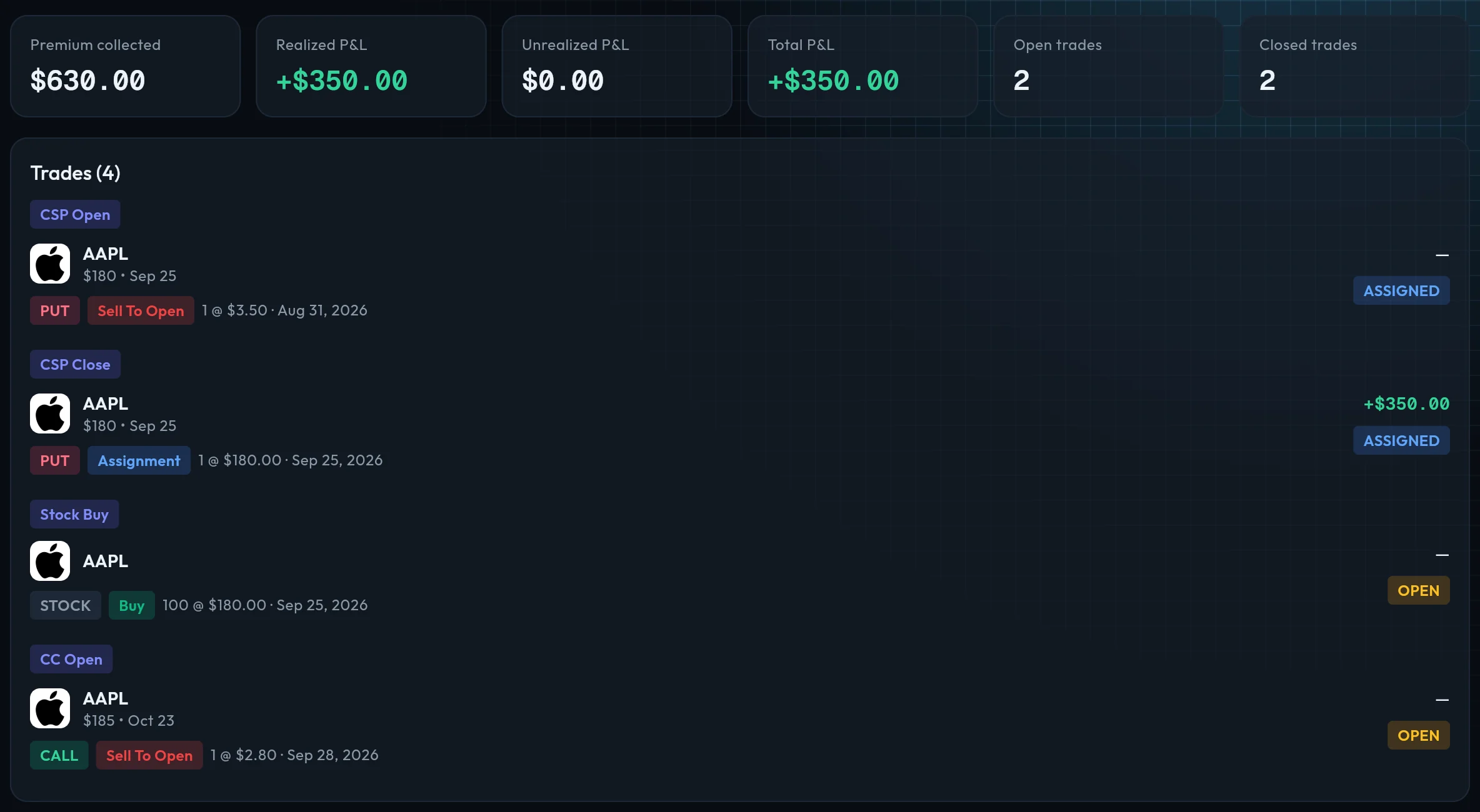
The cycle made $1,130. Had AAPL fallen instead, the position would have lost money below $173.70 a share, the net cost after both premiums. In OptionsVault the four trades are one wheel:
Premium collected
$630
Realized P&L
+$1,130
Status
Closed
Illustration of the example, with fees left out. Prices are made up for the walkthrough, not quotes. The net cost per share is a trading number, not your tax basis.
How to Calculate Your Return on the Wheel
A wheel's return is the premiums plus whatever the shares made or lost, measured against the cash the put tied up. Using the same AAPL cycle:
| Number | How to work it out | Example |
|---|---|---|
| Capital | Put strike × 100 shares | $180 × 100 = $18,000 |
| Total premium | Every put and call premium, minus anything paid to buy options back | $350 + $280 = $630 |
| Gain or loss on the shares | (Price sold − price bought) × 100 | ($185 − $180) × 100 = $500 |
| Total return | Total premium + gain or loss on the shares | $630 + $500 = $1,130 |
| Return on capital | Total return ÷ capital | $1,130 ÷ $18,000 = 6.3% in 60 days |
At that pace, 6.3% in 60 days is about 38.2% a year. Real results vary: a cycle can take months, and the shares can be sold below what you paid. Dividends received while holding the shares add to the return and are not counted here.
How to Track the Wheel Strategy
The wheel is hard to track because no single trade shows the result. An assigned put looks like a loss until you count the calls sold afterwards. Keep three things together for each stock:
1
Every put
Strike, expiration, premium and fees, and whether it expired, was bought back or was assigned.
2
The shares
The assignment price and date, and later the price and date they were sold or called away.
3
Every call
The same details as the puts, for each call sold while you held the shares.
A spreadsheet works for one stock. With several wheels running at once, each at a different stage, matching the rows by hand is where mistakes come in. OptionsVault does that matching from your imported trades.
What OptionsVault Tracks for the Wheel
Three ways to get trades in
Connect Robinhood for automatic sync (Pro), import a CSV export from any broker, or type trades in by hand.
Finds the wheel in your trades
A put you sold, shares bought at its strike within 30 days because it was assigned, and a call sold on those shares within a week: OptionsVault suggests the three as one wheel.
Spots a wheel that has just begun
When a put is assigned and no call has been sold yet, it is suggested as the start of a wheel, with the next step: sell a covered call.
One total for the whole cycle
A wheel shows premium collected across its puts and calls (net of buy-backs) and realized P&L including the gain or loss on the shares.
Keeps turning with you
After each broker sync, later calls, their closes and assignments, and further puts on the same stock join the wheel they belong to. Each open wheel shows its next expiration.
Wheels next to your other strategies
Analytics compares wheels with covered calls and cash-secured puts: P&L, win rate and premium. P&L is also broken down by ticker, by month and on a calendar.
Wheel grouping is a Pro feature. OptionsVault is a tracker, not a screener: it does not pick stocks or strikes, count dividends, show live Greeks or send assignment alerts.
The Wheel vs. Selling Puts or Calls Alone
Selling puts alone. You collect premium while the stock stays above your strike. When you are assigned, you hold shares with no plan for them.
Selling covered calls alone. You need the shares first, bought at the market price. When they are called away, you have to buy again to continue.
The wheel joins the two. Assignment on the put is how you get the shares, and the calls are what you do with them. That is also why it needs tracking as one position: the put, the shares and the calls each look different on their own from how they look together.
Wheel Strategy Tracking Questions
What is the wheel strategy in options?
The wheel is a way of selling options on a stock you are willing to own. You sell a cash-secured put. If it is assigned you buy the shares, then sell covered calls against them until they are called away. Then you start again with another put. You collect a premium at each step.
How do you track the wheel strategy?
Keep every put, the assigned shares and every call on the same stock together as one position, and add them up: total premium, plus the gain or loss on the shares. Tracking the legs separately hides the result, because an assigned put only makes sense next to the calls sold afterwards. A spreadsheet can do it for one stock. A tracker like OptionsVault groups the trades for you.
How do you calculate the return on a wheel?
Add the premium from every put and call to the gain or loss on the shares, then divide by the cash the put tied up (strike times 100). In the example on this page that is $1,130 on $18,000, or 6.3% over 60 days.
What if my put is never assigned?
Then it is not a wheel yet. Each put that expires or is bought back is a cash-secured put on its own, and OptionsVault tracks it that way. The wheel starts when a put is assigned and you hold the shares.
Does OptionsVault include dividends in the wheel return?
No. OptionsVault imports trades, assignments, exercises and expirations. Dividends are not imported, so a wheel shows premium and the gain or loss on the shares only.
Is the wheel strategy tracker free?
Grouping trades into a wheel is part of the Pro plan. The free plan tracks covered calls and cash-secured puts as separate positions. The pricing page has the current limits and price.
See pricing for what the free and Pro plans include.
Start Tracking Your Options Trades Today
Join options sellers who use OptionsVault to track strategies, analyze performance, and grow their portfolio. Free to start.